
EBICS: let your bank talk to Odoo directly
Your bank statements are already in Odoo when you arrive. Your payments leave without anyone uploading a file.
EBICS is the channel European banks open so that software, and not a person in front of a screen, exchanges files with them. It is how you connect a bank that does not appear in Odoo’s list.
We wrote the EBICS module for Odoo and we have maintained it since version 8. It is open source and there is no licence to pay for it. What the whole thing costs is set out below, before any technical detail.

What it changes for you
Your statements are already there
Every account, every morning, before anyone opens a laptop. Nobody logs into a bank site, nobody saves a file, nobody imports anything.
And because it runs on its own, you can tell at a glance whether a day is missing.
Your payments leave on their own
You approve a payment run in Odoo and it goes to the bank. No file to export, no file to upload, no second person needed just to move it from one screen to another.
It reaches banks the others cannot
Odoo’s standard bank synchronisation relies on outside providers, and their coverage stops at certain borders. Swiss banks are the usual example.
If your bank is missing from the list, this is normally how you connect it.
One morning, start to finish
At the start of this recording the bank card in Odoo still offers to search through 26 000 banks. It has no idea what your balance is, because nobody has told it.
Then the file arrives on its own, Odoo reads it, and one bank statement is created. Thirty seconds later the same card shows a real balance and a curve. Nobody opened a bank site, nobody saved a file, nobody imported anything.
This is what a morning looks like once the link is in place. Every account, every day.
And the payments, the same way
Two supplier invoices are already posted. You register the payments, Odoo groups them into a batch, you validate it, and the batch moves to Sent.
The last step is the one that usually costs an hour: instead of exporting a file, opening the bank portal and uploading it, Odoo sends it. The file, its format and the bank it goes to are all decided by the configuration, not by the person clicking.
No file leaves your accounting by hand, which also means no file can be altered on the way.
So what is it? A lane for software, not a website for people
A bank portal is built for a human being: a login page, a screen, a click. EBICS is the other door of the same bank, built for software.
Your bank opens the lane, your Odoo gets its own set of keys, and files travel both ways on a schedule.
Nobody signs in, because there is nothing to sign into.
What it costs, in full
Three lines, and the connector is not one of them. Your bank may also charge for the EBICS channel itself, and that one is between you and them.
The module: nothing
Account EBICS is open source, published on the Odoo Apps Store, and maintained from Odoo 8.0 through Odoo 19.0.
No licence, no subscription, nothing recurring from us, and the code stays yours.
The setup: what we invoice
The configuration in Odoo, the key ceremony with each bank, the tests, and the support while your banks come online.
A project with an end, not a subscription.
The EBICS library: 100 € then 25 € a month
The protocol needs a specialised library published by joonis, licensed directly from them: 100 € to start, then 25 € a month for the first EBICS user id and 10 € for each additional one, cancellable at the end of any month.
On a single connection that is 300 € a year.
Not sure your bank does EBICS? Check it yourself in thirty seconds
joonis, the publisher of the EBICS library, keeps a public directory of banks.
You type a BIC and it tells you which SEPA services the bank offers, which EBICS versions it supports, and its Host-ID.
Search your bank on the joonis bank directory.
A bank missing from that list is not a no. It is joonis’ own directory, not an official register.
If yours is not there, ask your bank whether it publishes an EBICS access point, and send us their answer.
The time it gives back is the whole point
Add up what your team spends on the banks every day: opening each portal, downloading, saving, importing, then exporting a payment file and uploading it somewhere else.
That is the time this replaces, every morning, for every account.
The detail, from here down
What follows is for whoever will implement it: what the standard is, what travels over the link, what your bank has to do, and how long it takes.
If you only needed to know whether EBICS solves your problem, the answer is above.
What EBICS actually is
Three things worth knowing before you ask your bank about it.
A standard, not a product
EBICS stands for Electronic Banking Internet Communication Standard. It belongs to EBICS SC, a company held by the German, French, Swiss and Austrian banking bodies: DK, CFONB, SIX and PSA.
No software vendor controls it, and other countries can join.
Host to host, not screen to screen
Your software authenticates with its own cryptographic keys and exchanges files directly with the bank’s access point.
There is no login page, no session, and nobody sitting in front of it.
Version 3.0.2 is the current specification
In force since 30 December 2022. The change that matters to you is BTF, a uniform way of naming what is being exchanged, in place of the country-specific order type codes of EBICS 2.x.
Many banks still run 2.5 in parallel.
What actually travels over the link
EBICS carries files, and the value of the connection depends entirely on which files your bank agrees to expose.
Coming in. CAMT.053 for the end of day statement, CAMT.052 for intraday movements, and MT940 where the bank still publishes it. These are structured statements, with a statement number and an opening and closing balance, not a stream of transactions.
Going out. pain.001 for credit transfers and pain.008 for direct debits, generated by Odoo from your payment batches.
The whole exchange, on one picture
Two directions, and nobody in the middle.
Your keys never leave your server, and the approval of a payment never enters Odoo.
That separation is not a detail, it is usually what a segregation of duties policy requires.
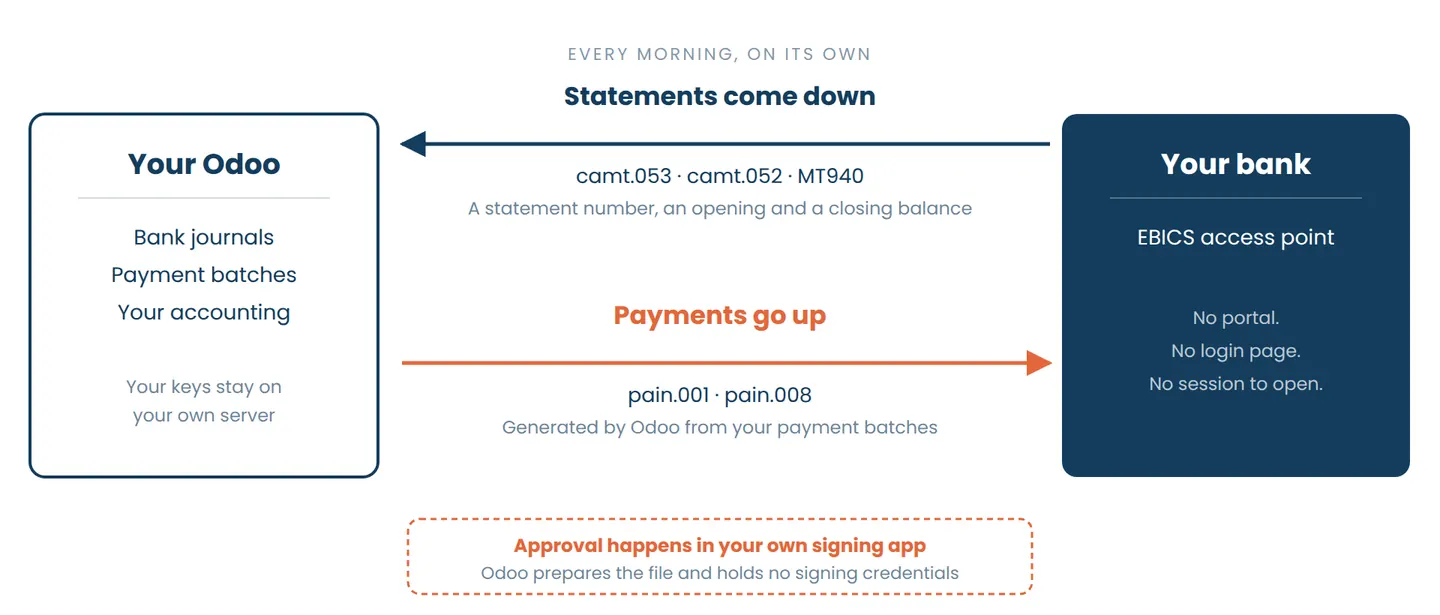
The parts that matter once you are implementing it
The bank opens an access point, your Odoo authenticates with its own cryptographic keys, and the exchange happens without a human in the middle. Three consequences worth knowing.
A test mode before the real thing
Submissions can be validated against the bank in test mode before anything is switched to production. Bank onboarding is where projects usually lose weeks.
The formats your banks actually send
The European statement formats and the French interbank format are read as they come, so a company banking in several countries does not need a converter in between.
Bank configuration is not for everyone
Access to the banking setup is a permission of its own, separate from ordinary accounting rights, so the connection cannot be altered by whoever happens to have an accounting login.
From keys to first payment
Bank onboarding is where EBICS projects lose weeks, and it is almost never for a technical reason. Here is the real sequence.
The bank opens the access
You receive the host ID, the address of the access point, your partner and user identifiers, and a letter carrying the hash values of the bank’s own keys.
INI and HIA
Your software generates your key pairs and sends them to the bank: the signature key first, then the authentication and encryption keys.
Two order types, one purpose: proving that the keys are yours.
The letters you have to post
Both steps produce initialisation letters that you print, sign and send to the bank.
Nobody expects this part, and it is what puts days or weeks between the technical setup and the first real exchange.
HPB and the hash comparison
Once the bank has activated your access, you retrieve its public keys and compare their hash values with the letter it sent you.
That comparison is what makes the channel trustworthy, and it is not a formality.
Test mode, then production
Statements are downloaded and a first payment file submitted while the bank still treats the connection as a test.
Only then does anything move for real.
EBICS in Odoo
We are not reselling somebody else’s connector. We wrote the one the Odoo community uses.
The connector is ours, and it is open
Account EBICS is published on the Odoo Apps Store by Noviat and maintained from Odoo 8.0 through Odoo 19.0. Eleven major versions, which is the only track record that matters when a bank connection has to survive your next migration.
Hosting is not neutral
The connection needs a Python library and your key files on the server, so it runs on Odoo.sh or on an on-premise installation.
This is worth settling before anything else.
Signing stays outside Odoo
Distributed signature means more than one person can be required to approve a payment, from an external signing application.
Odoo prepares the file and holds no signing credentials, which is what a segregation of duties policy usually demands.
Every exchange leaves a trace
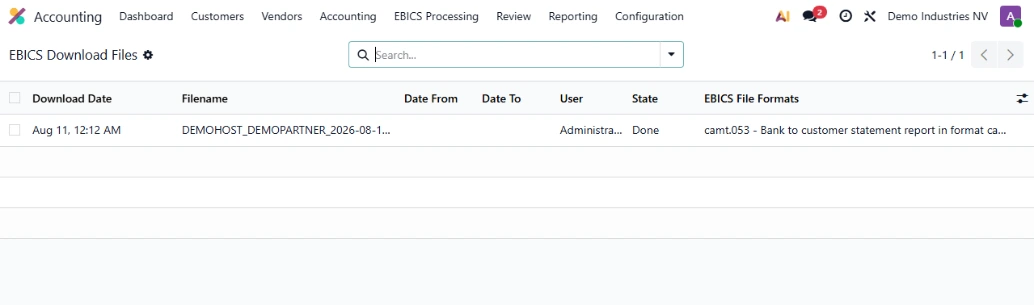
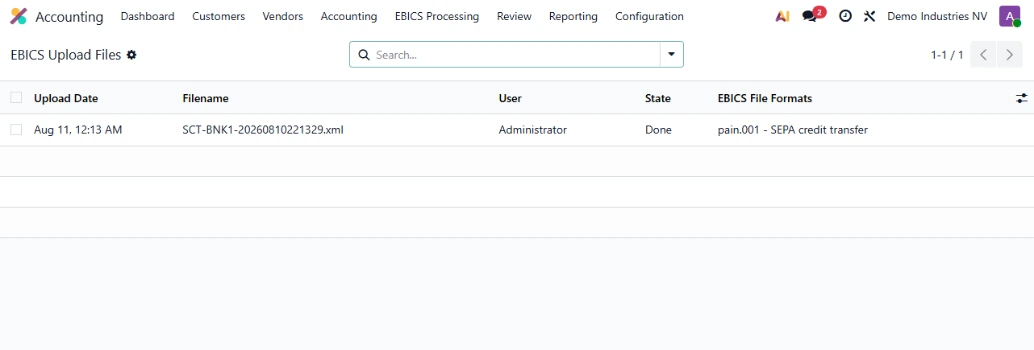
Each download and each upload is a record in Odoo, with the file it carried, the moment it happened and the user behind it.
When an auditor asks where a statement came from, the answer is one click away instead of a folder on somebody’s desktop.
Where EBICS is the ordinary way to bank
If you hold accounts in these countries, the channel is already there and your bank will not find the request unusual. Bank by bank, the directory linked above gives you the supported versions.
EBICS country by country
Germany
The historical home of the standard. EBICS is the ordinary corporate channel, and support among German banks is close to universal.
France
Adopted by the CFONB and offered by the French banks, where it took over from ETEBAC when that was withdrawn.
Switzerland and Austria
SIX and PSA both sit in EBICS SC, and the Swiss market publishes its own practice guidelines for each version of the specification.
The questions the rest of this page does not answer
Delays, who holds what, and what happens the day something goes wrong.
Count in weeks per bank rather than days, and the delay is almost never technical. The configuration on the Odoo side takes hours.
What sets the pace is the bank: the initialisation letters have to be signed and posted, then the bank activates the access on its own schedule.
Starting the paperwork early is the single thing that shortens a project.
Usually yes, as a subscription to the EBICS channel itself, and it varies from one bank to another.
It is billed by your bank, separately from anything on the Odoo side.
Ask them for the figure at the same time as you ask whether they publish an access point, it saves a round trip.
No. The connection uses your own company keys, generated on your side and kept on your server, and payment approval happens in your own signing application.
There is no bank login stored in Odoo, and none held by us.
The bank sends back an acknowledgement saying what it did with the file.
You see the outcome in Odoo rather than discovering it days later on a portal, you correct the batch and resend it.
This is the part that separates a real link from a file dropped somewhere and forgotten.
Yes, and that is usually why people come to it.
Each bank connection is its own configuration and each legal entity has its own keys, so adding a bank or a company later does not disturb what already runs.
The module has followed every major version of Odoo since version 8, which is eleven of them.
A bank connection that stops at the next release becomes a reason to postpone the upgrade, and an Odoo two versions behind costs far more than the connection ever did.
Bank connectivity in Odoo
The five ways to connect a bank to Odoo, compared on the criteria that actually decide when you have more than one bank to connect.
Compare the methods
Finance and accounting in Odoo
The chain around the bank link: the ledger, the taxes, the month end close and the reports your accountant actually needs.
Finance in Odoo
Tell us your banks and we will do the maths
Name your banks and tell us how statements reach your accounting today. We come back with the ones that can be connected, what it takes, and the time it gives your team back every morning. Thirty minutes, no commitment.